How GPS Dog Trackers Can Help When a Dog Goes Missing
Learn how location updates, last-known positions, route history and tracking alerts can support a missing-dog search—and what to do if your tracker stops reporting.
Practical guide for dog owners
When a dog goes missing, knowing where to begin looking can make a stressful situation easier to manage. A GPS dog tracker may provide a recent location, show previous movements or help you follow new reports as they arrive. These details can give you useful clues about where your dog may be.
However, GPS tracking is not a guarantee of recovery. A device may lose power, become detached, lose communication coverage or display an older location. The best approach is to use the tracker alongside a prompt, organised search and other established ways of finding a missing pet.
If your dog is missing now: Check the tracker’s latest reported location and timestamp, begin safe local search efforts, and contact nearby animal shelters, veterinary practices and relevant local authorities. Do not wait for a tracker to reconnect before taking other reasonable steps.
How Can a GPS Dog Tracker Help When a Dog Goes Missing?
A GPS dog tracker determines the device’s position using satellite-based positioning. Depending on the model, it then sends that information to an app or receiver through cellular networks, satellite communication or radio. If the tracker is still attached to your dog and can report its location, the information may help you narrow your search.

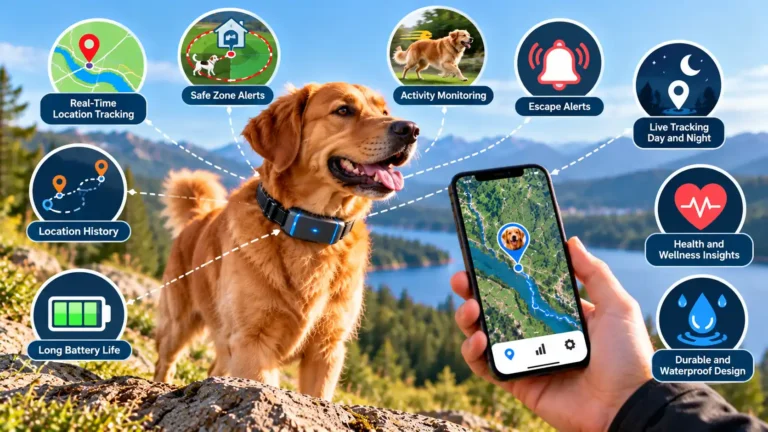
A GPS tracker can provide useful location information when the device is operating and able to report updates.
Identify a starting point
The latest reported position may help you decide which area to check first rather than searching without any location information.
Monitor new reports
If the device continues transmitting, updated positions may help you understand whether the reported location is changing.
Review previous movements
Supported route history may provide clues about the dog’s recent movements and the area where updates stopped.
Receive alerts
Some trackers offer geofence or other notifications that may alert you when the reported position meets a configured condition.
Important distinction: The tracker’s position is the location of the device, not necessarily proof of your dog’s exact position. The tracker could have fallen off, been damaged or stopped transmitting.
Use the Last Known Location to Guide Your Search
If your dog disappears and the tracker is not updating, the last known location may still be useful. It is the most recent position available to the app, but it may not represent where your dog is now.
Check the timestamp first
Open the tracking app and look for the date and time associated with the latest location. A position recorded moments ago provides different information from one recorded an hour earlier. The longer the gap, the more cautious you should be about treating the marker as current.
Review the surrounding area
Use the map to identify nearby streets, paths, parks, open spaces and other landmarks. Consider where your dog could safely have travelled from that point. Do not assume the dog followed the route line exactly, because many apps connect separate recorded positions rather than tracking every step.
Check more than one report
If the app shows several recent positions, compare their timestamps and general direction of movement. A series of reports may give you a better understanding of the dog’s possible route than a single marker.
Search tip: Treat the last known location as a starting clue. Check the area safely and expand the search as appropriate, while continuing other missing-pet actions.
Follow Live GPS Updates When Available
Some trackers provide frequent location updates or a live-tracking mode. If your device is still reporting positions, these updates may help you understand where the tracker is moving.

What to check in the tracking app
- Latest timestamp: Confirm when the most recent position was recorded or received.
- Connection status: Look for indications that the tracker is online or communicating.
- Movement: Compare successive location reports rather than relying on a single point.
- Accuracy information: Check whether the app provides an estimate of location uncertainty.
- Battery status: A low battery may limit how long the tracker can continue reporting.
Update frequency differs between products and settings. Even a tracker advertised with live tracking may send updates at intervals, and reports can be delayed. Do not assume that every map refresh is an exact, instantaneous view of your dog’s location.
Keep the search safe. If a location appears to be changing, do not drive while watching your phone or enter unsafe terrain. Ask another person to monitor the app if possible, and approach any reported location carefully.
Use Route History and Tracking Alerts
Depending on the model and service plan, a GPS dog tracker may retain location history or provide alerts when the device crosses a virtual boundary. These features can offer additional clues when a dog goes missing.
Location history
Location history displays previously recorded positions. Reviewing it may help you identify the dog’s recent route, areas visited or the last point recorded before the tracker stopped reporting. The usefulness of this information depends on the update frequency, available history period and quality of the recorded positions.
Geofence alerts
A geofence is a virtual boundary created in the tracking app. If the tracker supports geofence alerts, you may receive a notification when a reported position crosses that boundary. This may be helpful if a dog leaves a defined home area before you notice.
Offline or low-battery notifications
Some apps can notify you about a low battery or loss of communication. These alerts may help you recognise a problem earlier, but availability and timing vary by product. An alert may not arrive if the device cannot communicate.
Remember that location history and alerts are not universal features. Check the manufacturer’s specifications and learn how your tracker behaves before relying on them in an emergency.
How to Organise a Search Using GPS Information
A GPS tracker can help inform a search, but it works best as part of a broader plan. The following steps can help you use available information without overlooking other important actions.
Check the device and map
Open the app, confirm the dog’s tracker is selected, check the battery and note the last reported location and timestamp.
Record useful details
Write down the last known position, update time and any recent route information. Save a screenshot if it helps you share accurate information with trusted helpers.
Search the area safely
Check nearby places where your dog may reasonably have travelled. Take a lead, a recent photo and suitable identification details, and avoid entering dangerous areas.
Contact local organisations
Notify animal shelters, veterinary practices, animal control or the appropriate local authority. Provide a clear description, photo and contact details.
Share accurate information
Tell trusted search helpers the last known location and time. Make clear whether the information is current or comes from an older report.
Continue checking for updates
Monitor the tracker if it is working, but continue reasonable search efforts if the device goes offline or stops reporting.
What information should you prepare?
- Your dog’s name, breed or appearance, size and distinguishing marks.
- A recent, clear photograph of your dog.
- The time and place where the dog was last seen.
- The tracker’s last known location and its timestamp, if available.
- Your contact details and any relevant identification information.
- Details of any medical, mobility or behavioural needs that search helpers should know.
If your dog is frightened, injured or behaving unpredictably, avoid chasing or cornering the animal. Ask an experienced local rescue group or animal professional for advice when appropriate.
What If the GPS Dog Tracker Stops Working?
A missing dog situation can become more difficult when the tracker stops reporting. The key is to distinguish a temporary technical problem from a location that is simply no longer current, while continuing the search.
| What you see | Possible explanation | What to do |
|---|---|---|
| Map shows an old position | No new report has reached the app. | Note the timestamp, check device status and begin searching from the last reported area as appropriate. |
| Tracker appears offline | Battery, communication coverage, service or device issues. | Follow the app’s troubleshooting guidance, but do not delay other search efforts. |
| Location jumps around | Positioning uncertainty, poor reception or delayed reports. | Compare multiple updates and treat the location as an estimate rather than a precise route. |
| Battery is low | The tracker may soon stop operating. | Prioritise sensible use of the available location information and continue other search actions. |
| No route history available | The device may not support history or the data may not be retained. | Use the latest available report and other information about where the dog was last seen. |
Do not rely on an old marker as proof of current location. If the tracker has lost power or connectivity, the dog may have travelled elsewhere. Continue the search, contact local animal organisations and share accurate information.
What GPS Dog Trackers Cannot Guarantee
GPS trackers can be useful, but understanding their limitations is essential when a dog goes missing.
Communication coverage
A tracker may calculate its position but be unable to send it to your phone. Cellular models depend on compatible network coverage and service, while radio- and satellite-based systems have their own operating requirements and limitations.
Battery life and physical attachment
If the battery runs out or the tracker becomes detached, its location may no longer represent your dog’s position. Check that the device is securely attached and charged before walks.
Location uncertainty
Buildings, dense vegetation, terrain, satellite reception and delayed updates can affect the location information shown on the map. The marker may not identify an exact point where the dog can be found.
Subscription and service requirements
Some products require an active plan for cellular connectivity, map features or history. Confirm these requirements before relying on the device during a trip or in an unfamiliar area.
GPS trackers and microchips do different jobs
A GPS tracker may report a device’s location, while an implanted microchip provides identification when scanned by a suitable reader. A microchip is not a live GPS device. Keeping your dog’s identification tag and microchip registration up to date provides an additional way to help reunite you if your dog is found.
Prepare Before Your Dog Goes Missing
The best time to learn how your GPS tracker works is before an emergency. A few regular checks can help you understand the information the device can provide and identify problems early.

- Test the tracker outdoors and learn how frequently it updates.
- Check the last-location timestamp and connection indicators in the app.
- Understand the coverage and communication method your model uses.
- Keep the battery charged and the tracker securely attached.
- Learn how to access route history and alerts, if supported.
- Keep collar identification details and microchip registration current.
- Store a recent photograph of your dog where you can access it quickly.
- Know which local shelters, veterinary practices and animal services to contact.
Frequently Asked Questions
1. Can a GPS dog tracker help me find a missing dog?
Yes, it may help by providing the tracker’s reported location, movement updates or previous route information. Its usefulness depends on battery power, attachment, positioning quality and the ability to transmit updates. It cannot guarantee recovery.
2. What should I do first if my dog goes missing?
Check the tracker’s latest location and timestamp if available, search the immediate area safely, and contact local shelters, veterinary practices and relevant animal services. Share a recent photo and accurate details. Do not delay other search efforts if tracking is unavailable.
3. What is the last known location on a GPS dog tracker?
It is the most recent position available to the app or receiver. It may be older than the current time, so check the timestamp and avoid assuming that your dog is still at that point.
4. Can I track my dog if the GPS tracker loses cellular coverage?
That depends on the model. Some cellular trackers cannot send new reports without suitable network coverage, while certain radio- or satellite-based systems may work under different conditions. Check your product’s communication method and limitations.
5. Will a GPS tracker show my dog’s exact location?
Not necessarily. Positioning uncertainty, map-display limitations and delayed updates can affect the marker. Check any accuracy estimate and the time of the latest report before interpreting the displayed location.
6. Can a GPS dog tracker show where my dog has been?
Some models record location history or route playback. Others provide limited history or no history at all. Available records depend on the device, app settings, service plan and data-retention period.
7. What if my missing dog’s tracker battery dies?
Use the last available location as one clue, check when it was reported and continue the search using other methods. Contact local animal organisations and share your dog’s details rather than waiting for the tracker to resume reporting.
8. Can geofence alerts tell me if my dog escapes?
If your tracker supports geofencing, it may send an alert when a reported location crosses a configured boundary. Alert timing depends on the device and communication conditions, so geofencing should not replace secure fencing and supervision.
9. Does a microchip track a missing dog’s location?
No. An implanted microchip normally helps identify a dog when scanned with a compatible reader. It does not provide live GPS tracking, so keep registration details current and use a GPS tracker separately if location tracking is needed.
10. Should I keep searching if the GPS app shows a location?
Yes. Treat the map as useful information rather than a guarantee. The reported location may be old or uncertain, so continue safe search efforts and coordinate with appropriate local animal services.
Use GPS Tracking as Part of a Wider Missing-Dog Plan
A GPS dog tracker may help you identify a starting point, review recent movement and monitor new reports when the device is working. Understanding timestamps, communication status and location uncertainty helps you interpret that information more responsibly.
Keep your tracker charged and secure, maintain your dog’s identification and prepare a basic search plan before you need it. If your dog goes missing, use every reliable source of information available and do not allow a tracker failure to delay practical action.
Editorial note: Tracker features and performance vary by manufacturer, device, service plan and location. This guide offers general educational information and does not guarantee that a GPS tracker will locate or recover a missing dog.