Why Is My GPS Dog Tracker Not Updating Its Location?
An old location on your dog’s tracking app can be worrying, especially when you need current information. Learn how to check the timestamp, battery, connectivity, GPS reception, and tracking settings to find out why location updates have stopped.

If your GPS dog tracker is not updating, possible causes include a low battery, a lost cellular connection, weak GPS reception, a power-saving setting, or a delay in reporting location data. The cause depends on your device and the tracking technology it uses.
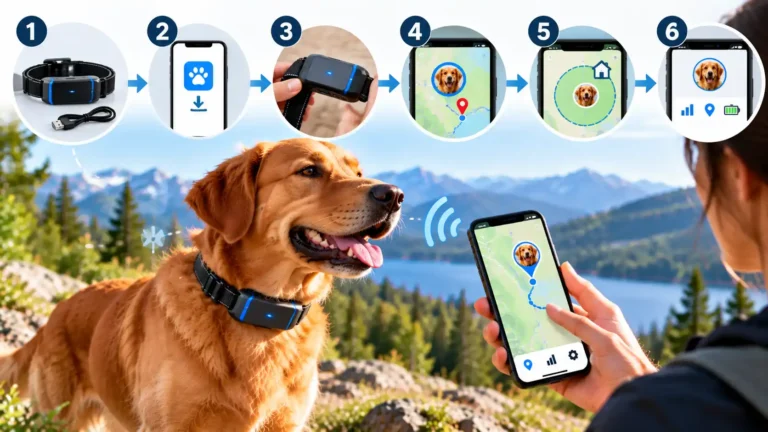
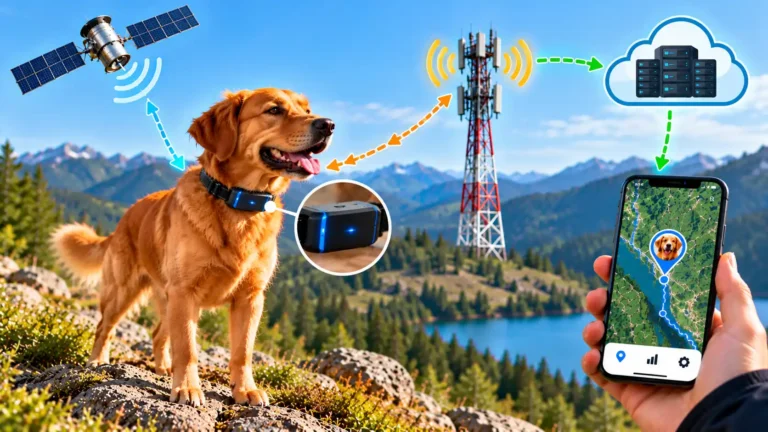
GPS positioning and data transmission are different functions. A connected tracker may need to determine its position, transmit that information through a supported network, and deliver it to the app. A problem at any stage can leave the displayed location out of date.
Quick answer: What should you check first?
- Check the last reported location timestamp.
- Confirm that the tracker is powered on and adequately charged.
- Check GPS, network, receiver, and online status.
- Review tracking frequency and power-saving settings.
- Test the device outdoors where it can receive suitable signals.
- Use the manufacturer’s recommended reconnection procedure.
If your dog is missing, begin searching immediately. Do not delay the search while troubleshooting an offline tracker.
1. Check the Timestamp First

When the app shows an old dog location, the timestamp is one of the most useful diagnostic clues. Look for labels such as Last updated, Last seen, Last location, or Last connected.
These labels may describe different events. Check the manufacturer’s documentation to understand exactly what each status means on your device.
Example: An old timestamp
The map displays a location from 35 minutes ago. The app may be showing the last position successfully reported, not a live position. Check the battery and connection status next.
Example: A fresh timestamp
The timestamp keeps advancing, but the pin appears incorrect. This is a location-accuracy issue rather than a missing-update issue.
Check these details
- When was the location last recorded or reported?
- Does the tracker show online, offline, or connecting?
- Is the app showing a history entry instead of a current update?
- Does refreshing the app change the status or timestamp?
If the timestamp is stale, continue through this guide. If the timestamp is fresh but the position seems wrong, use the separate article about GPS dog trackers showing the wrong location.
2. Confirm Battery and Power Status

A tracker needs sufficient power to run its positioning, communication, and other electronic components. If the battery is depleted or the device has switched off, it cannot continue reporting new locations.
Some models reduce reporting frequency to save energy. Others disconnect or shut down at low battery levels. Behavior varies by device, so check the manual rather than assuming all trackers respond in the same way.
How to check the battery
- Check the reported battery level in the manufacturer’s app.
- Look for low-battery warnings or an offline status.
- Inspect the tracker for damage or unusual heat.
- Charge it according to the manufacturer’s instructions.
- Confirm that it powers on and attempts to reconnect.
If the tracker will not charge, becomes unusually hot, or shows battery damage, stop using it and follow the manufacturer’s safety guidance. Do not attempt an improvised repair of a sealed battery.
3. Check Cellular or Receiver Connectivity

GPS or another supported satellite-positioning system helps determine location. Cellular connectivity commonly carries location data from the tracker to a server, which then makes the information available in the app.
A tracker may determine its position but fail to transmit it. A cellular connection also does not guarantee that the device has obtained a fresh GPS fix.
Check the connection status
- Look for online, offline, network, or receiver warnings.
- Confirm that the model supports the available network.
- Check the subscription or service plan, where required.
- Consider whether the dog is in a rural area, valley, building, or other area with limited coverage.
- Check official service notices for a reported outage.
Some devices use a nearby receiver, a dedicated radio link, a base station, or a proprietary network rather than cellular service. Check receiver power, range, pairing, and connection status for those models.
| What you see | Possible explanation | What to check |
|---|---|---|
| Tracker is offline | Power, network, receiver, or service issue | Battery, network, account, and receiver |
| GPS unavailable | No usable position fix | Outdoor reception and device status |
| Old location but connected | Reporting delay, update interval, or device fault | Timestamp, tracking mode, and support guidance |
| Several devices stop updating | Possible service or platform outage | Official service status |
An offline tracker should not be assumed to be providing a current position just because its last location remains visible.
4. Review Update and Power-Saving Settings

Some trackers prioritize battery life, while others offer more frequent reporting in an active tracking mode. A low-frequency setting can make location updates appear less frequent than expected.
Depending on the product, settings may include sleep mode, power-saving mode, tracking intervals, safe zones, and live tracking. Not every model has all these features.
Settings worth reviewing
- Tracking interval: Check how often the device reports locations.
- Power-saving mode: Check whether the selected mode reduces reporting.
- Safe zones: Review whether a zone-specific setting changes reporting behavior.
- Live tracking: If available, activate it according to the manual.
- App permissions: Confirm the permissions required by the device’s app.
- Account and subscription: Confirm that required services remain active.
Where possible, change one setting at a time. This makes it easier to identify the cause without accidentally disabling another useful feature.
5. Consider Satellite Reception and Obstructions

GPS receivers need usable satellite signals to calculate a position. Buildings, roofs, bridges, dense tree cover, and other obstructions can weaken or block those signals. Indoor and underground environments can be particularly challenging.
GPS.gov explains that positioning performance depends on factors such as satellite geometry, signal blockage, atmospheric conditions, and receiver design. Read the official GPS accuracy guidance.
Try a controlled outdoor test
- Take the tracker to an open outdoor area, if safe and practical.
- Keep it powered on and follow the manufacturer’s positioning instructions.
- Allow time for it to obtain a position and transmit the update.
- Check whether the timestamp changes.
- Repeat in another suitable outdoor location if necessary.
An outdoor test helps narrow down the possibilities, but it cannot guarantee an immediate update. Positioning time varies with the device, environment, and receiver state.
Good satellite reception also does not guarantee cellular coverage. A tracker may obtain a position but still be unable to send it to the app.
6. Restart or Reconnect Only as the Manual Advises

If the basic checks have not helped, a manufacturer-approved restart or reconnection procedure may be appropriate. Procedures vary between models and can involve buttons, charging, pairing, or app-based instructions.
Before restarting, check the support page for your exact device. A factory reset can remove configuration or pairing information.
A cautious recovery sequence
- Record the error message and last-update time.
- Check the battery and charging status.
- Confirm the tracker is linked to the correct account.
- Follow the approved restart or reconnection steps.
- Test again in a suitable outdoor location.
- Record whether the timestamp changes and the device reports online.
If the same fault returns after the approved procedure, document the behavior and contact support rather than repeating the same steps indefinitely.
7. When to Contact Manufacturer Support

Contact the manufacturer’s support team if the tracker still fails to report new locations after the appropriate checks or displays a persistent error that you cannot resolve.
Provide the device details and the results of your tests. This can help support staff distinguish a connection problem from a configuration or hardware fault.
Contact support if:
- The tracker remains offline despite adequate power and expected connectivity.
- It cannot obtain or report a position in a suitable outdoor test.
- It repeatedly disconnects after an approved restart.
- The app shows persistent errors or conflicting device status.
- The tracker will not charge, power on, or maintain a connection.
- You suspect a hardware defect or service issue.
Information to prepare
- Tracker brand, model, and firmware version if available.
- Phone model, operating system, and app version.
- Last reported location timestamp and current status message.
- Battery status and any indicator lights or error codes.
- General test location and conditions.
- Troubleshooting steps already completed.
Share diagnostic information through the manufacturer’s official support channel. Avoid posting account identifiers or precise location history publicly.
8. Troubleshooting Checklist

Use this checklist to work through common reasons a GPS dog tracker is not updating. Complete the steps that apply to your model and follow its manual wherever instructions differ.
- Checked the last reported location timestamp.
- Confirmed that the tracker is switched on.
- Checked the battery and charged the device if necessary.
- Reviewed GPS, cellular, receiver, and online status.
- Confirmed required subscription or service status.
- Reviewed update frequency and power-saving settings.
- Tested in a suitable open outdoor area.
- Checked official service notices where available.
- Used only the restart procedure approved for the model.
- Recorded the results before contacting support.
What your results may tell you
| Test result | Reasonable next step |
|---|---|
| Timestamp updates outdoors | Investigate the original environment and settings. |
| Tracker online, location still old | Review reporting interval and GPS status. |
| Tracker remains offline | Recheck power, network, receiver, and service status. |
| Tracker will not power on | Follow charging guidance or contact support. |
| Timestamp is fresh but pin is wrong | Investigate positioning accuracy separately. |
These observations help narrow the possibilities, but they are not definitive hardware diagnoses. The device’s design and diagnostic information determine what can be concluded.
Frequently Asked Questions
1. Why is my GPS dog tracker not updating?
Possible causes include a low battery, lost connectivity, weak GPS reception, power-saving settings, or a delayed reporting interval. Check the timestamp first, then inspect the power and connection status.
2. Why is my dog’s tracker showing an old location?
The app may be displaying the last successfully reported position because no newer location has arrived. Check the timestamp and tracker status. An old location does not confirm where your dog is now.
3. Can a GPS dog tracker work without cellular service?
A GPS receiver can calculate a position from satellite signals without cellular service. However, a connected tracker may need cellular service to send that position to an app. Radio trackers and systems using dedicated receivers work differently.
4. Can a low battery stop location updates?
Yes. A depleted battery can stop a tracker from operating. Some models also change reporting behavior to conserve power. Charge the device as instructed and confirm that it reconnects.
5. Why does my tracker work outdoors but not indoors?
Roofs and walls can obstruct satellite signals, and buildings can affect wireless connectivity. Compare the device’s GPS and network status outdoors and check the manufacturer’s indoor-use guidance.
6. Does live tracking guarantee continuous updates?
No. Live tracking may increase reporting frequency, but results still depend on the device, battery, signal availability, network coverage, and service design.
7. How long should I wait for my tracker to reconnect?
There is no universal reconnection time. It depends on the model, reception, receiver state, and communication system. Follow the manufacturer’s recommended test rather than relying on a generic time limit.
8. Will restarting fix a GPS tracker that is not updating?
An approved restart may resolve some temporary faults, but it will not fix every battery, coverage, service, or hardware problem. Follow the model-specific procedure and avoid a factory reset unless advised.
9. Why does the tracker show a fresh timestamp but the wrong place?
A fresh timestamp with an incorrect position is different from a missing update. Investigate GPS reception, positioning, and map interpretation in the separate wrong-location guide.
10. What should I do if my dog is missing and the tracker is offline?
Begin searching immediately. Contact local animal shelters and animal control, notify neighbors, and share current identification details. Do not wait for the tracker to reconnect.
The American Kennel Club has a useful lost-dog search guide.
11. When should I replace my GPS dog tracker?
Do not replace a tracker based on one delayed update alone. First check power, coverage, configuration, and service status. Consider repair or replacement if a hardware fault is confirmed or repeated failures persist after recommended troubleshooting.
12. Is a GPS tracker enough to protect a lost dog?
No single technology guarantees a safe return. Keep identification tags current and maintain a registered microchip alongside any tracking device. A microchip provides identification, not GPS location tracking.
Learn more from the American Kennel Club’s microchip guide.
Final Thoughts: Get Your Tracker Reporting Again
When your GPS dog tracker stops updating, start with the timestamp, then check battery power, connectivity, reporting settings, and satellite reception. A controlled outdoor test and the manufacturer’s recommended reconnection procedure can help narrow down the cause.
Remember that the map may show the last reported location rather than your dog’s current whereabouts. If your dog is missing, begin searching immediately and use other identification and recovery methods while troubleshooting the tracker.
If the problem persists, contact the manufacturer with the device model, status messages, timestamps, and test results. This information can help identify whether the issue concerns power, connectivity, settings, or the device itself.
Editorial note: GPS performance and troubleshooting procedures vary by device. Always follow the current instructions for your exact model.