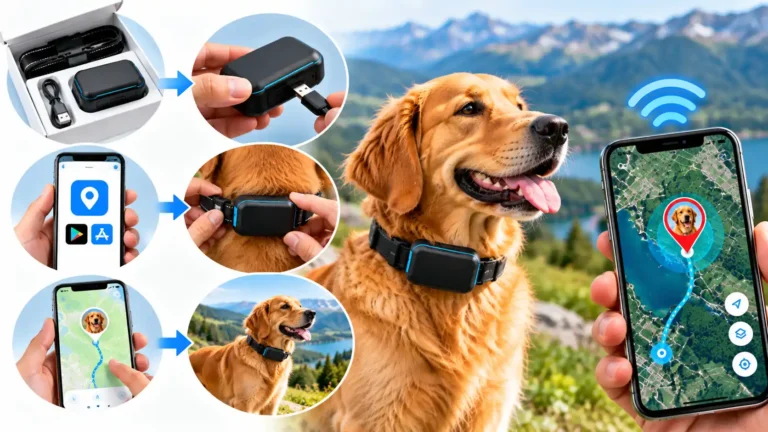
How to Use a GPS Dog Tracker: Step-by-Step Guide
A GPS dog tracker can help you check your dog’s location, receive escape alerts and review movement history. Learn how to set up your device, connect it to an app, configure safety settings and use it confidently during everyday walks and outdoor adventures.
Follow the Setup Steps
Using a GPS dog tracker is usually straightforward once the device is charged, activated and connected to its companion app. However, the exact setup process differs between manufacturers. Some trackers use cellular networks to send location updates, while other tracking systems use different communication technologies.
Whether you have just purchased a GPS collar or want to make better use of an existing device, this guide walks you through the main steps. It also explains how to check location updates, create virtual fences, manage battery life and understand the limits of GPS tracking.
1. What You Need Before Using a GPS Dog Tracker
Gather the basic equipment and account information before beginning. Preparing everything in advance makes setup easier and helps you identify problems before taking your dog out.
GPS Tracker
Check the device, mounting clip, charging cable and included accessories.
Compatible Smartphone
Make sure your phone supports the manufacturer’s app and has internet access.
Charged Battery
Charge the tracker according to the manufacturer’s instructions before testing it.
Connection or Plan
Check whether activation, a cellular subscription or another service is required.
Suitable Collar
Confirm the tracker fits securely and is comfortable for your dog’s size.
Suitable Test Area
Choose a safe outdoor area where you can check location reporting without losing control of your dog.
Some devices require an account or subscription before location tracking becomes available. Review the full cost, including recurring fees, before activation.
2. How to Set Up a GPS Dog Tracker Step by Step
Use these general steps as a starting point. Always follow any model-specific instructions, because activation sequences and app menus vary.
Charge the Tracker and Inspect the Device
Charge the device using the supplied cable or the manufacturer’s recommended charger. Check the charging indicator, if available, and inspect the tracker for damage.
Make sure the charging port and seals are clean and dry where the manufacturer’s instructions require this. Do not expose the device to water while charging unless it is specifically designed for that use.
Install the Official Smartphone App
Find the official app through the manufacturer’s website or the appropriate app store. Check the developer name before downloading to avoid unofficial applications.
Install the app, open it and create an account or sign in as directed. Review the app’s permissions and enable the access needed for its functions, such as notifications and location-related settings on your phone.
Activate and Pair the Tracker
Follow the in-app instructions to add your device. This may involve scanning a QR code, entering a device ID, pressing a pairing button or following another manufacturer-specific process.
If a subscription is required, complete activation through the official service. Wait for the app to confirm that the device has been added successfully.
Allow the Tracker to Obtain a Location
Move to a suitable outdoor area with a reasonably clear view of the sky, then follow the manufacturer’s instructions for obtaining the first position. Initial positioning may take longer than later updates.
Check the timestamp or status shown in the app. A map pin alone does not prove that the position is current; it may represent the last reported location.
Attach the Tracker Securely to Your Dog’s Collar
Use the supplied mounting system and follow the recommended orientation. Check that the tracker cannot easily slide off or detach when your dog moves.
Make sure the added weight and shape are suitable for your dog. The collar should remain comfortable and should not restrict movement, breathing or normal behaviour.
Test Location Updates and Notifications
With your dog safely under control, compare the app’s reported location with your actual surroundings. Walk a short, controlled route and check whether the app updates as expected.
If the device offers alerts, test them using the manufacturer’s recommended procedure. Do not deliberately let your dog escape to test an escape notification.
Customise the Settings
Choose suitable tracking modes, notification preferences and safe zones. Review the options for location history, activity reports and authorised location sharing if your tracker supports them.
Start with settings that suit your daily routine. Intensive tracking modes may use more battery power, so understand the trade-off between frequent updates and operating time.
Make a Routine for Charging and Checks
Check the battery before longer outings and charge the tracker according to the manufacturer’s recommendations. Inspect the attachment regularly and keep the app updated.
Confirm that the tracker is reporting a recent position before relying on it during a walk, holiday or outdoor activity.
3. How to Track Your Dog’s Location
Once your device is activated, location tracking generally takes place through the manufacturer’s app or compatible tracking platform.

Check your dog’s reported location and device status before and during outdoor activities.
How to check the current or last reported position
- Open the tracker app and select the correct dog or device.
- Open the map or location screen.
- Check the location marker and the timestamp of the last update.
- Review any connection or tracking-status message.
- If the position appears outdated, follow the app’s instructions to refresh or resume tracking.
Some trackers provide frequent updates in an active tracking mode. Others report at intervals or update differently depending on movement, settings and network conditions.
Read our related guide: How accurate are GPS dog trackers?
4. How to Set Up a Virtual Fence or Safe Zone
A virtual fence, also called a geofence, is a digital boundary drawn on a map. Supported trackers can send an alert when a reported location crosses that boundary.
General setup process
- Open the app and locate the safe-zone or geofence feature.
- Select the area you want to monitor, such as your home or a holiday property.
- Set the boundary according to the app’s available options.
- Choose the alerts you want to receive, such as exit or entry notifications.
- Save the zone and check that it appears in the correct position on the map.
- Test the settings safely, following the manufacturer’s instructions.
Tips for creating useful boundaries
- Check the boundary against the actual layout of your property.
- Avoid assuming the digital boundary matches a physical fence exactly.
- Allow for possible location error and alert delays.
- Review saved zones when travelling to a different location.
- Check that app notifications are enabled on your phone.
A virtual fence is not a physical barrier. It generally does not stop a dog from leaving an area, and an alert is not guaranteed to arrive instantly in every condition. Continue using appropriate supervision and secure fencing.
5. How to View Location History and Activity Data
Some GPS dog trackers save previous locations, routes or activity estimates. These features can help you understand your dog’s routine and review where it travelled.
Reviewing location history
- Open the history or route section of the app.
- Select the dog, device or date range you want to review.
- Examine the recorded positions and route displayed on the map.
- Check the timestamps to understand when the information was recorded.
- Note any gaps that could indicate missed updates or limited connectivity.
Using activity monitoring
If your tracker includes activity features, look for movement estimates, active time, rest patterns or longer-term trends. Use these figures as general information rather than a precise measure of exercise or health.
Tracking history may be limited by the product, storage period or subscription plan. Check the manufacturer’s terms before assuming that every location will be stored indefinitely.
6. How to Manage GPS Dog Tracker Battery Life
Battery management matters because a tracker with no power cannot continue operating as intended. Actual battery life varies according to the model, update frequency, signal conditions, temperature and usage.
Check Before Walks
Review the displayed battery level before leaving home, especially for longer trips.
Choose Tracking Modes
Use the tracking frequency that fits your needs, understanding that more frequent updates may consume more power.
Enable Low-Battery Alerts
Where available, set notifications to remind you to charge the device.
Follow the manufacturer’s charging and storage guidance. Avoid leaving a depleted tracker unchecked for long periods, and inspect the device if its battery life changes unexpectedly.
For more detail, read How long do GPS dog trackers last?
7. How to Use a GPS Dog Tracker on Walks and Outdoor Adventures
Outdoor conditions can affect tracking performance. Buildings, dense vegetation, steep terrain and poor mobile coverage may influence the quality or timeliness of location updates.
Before leaving home
- Charge the tracker and check its battery status.
- Confirm that the app shows a recent location update.
- Inspect the collar mount and attachment.
- Review coverage in the area you plan to visit.
- Confirm that notifications are enabled if you rely on alerts.
While walking or hiking
- Keep your dog under appropriate physical control.
- Check the map if you need to verify the reported position.
- Be aware that location updates may be delayed in difficult terrain.
- Conserve battery when appropriate, without disabling safety functions you need.
- Follow local rules for leads, wildlife protection and access to trails.
After returning
Check the device for damage, mud or moisture, and clean it according to the manufacturer’s instructions. Review location history if useful, then recharge the tracker when needed.
8. How to Use a GPS Dog Tracker If Your Dog Goes Missing
If your dog disappears, a GPS tracker may help you identify the last reported position or follow new updates. The device should be used as one part of a broader search plan.
- Open the tracking app. Select the correct dog and check the most recent position and timestamp.
- Activate the available tracking mode. Follow the manufacturer’s instructions if a more frequent update mode is available.
- Check the connection status. Determine whether the tracker is reporting new positions or showing an older location.
- Search carefully. Use the location information to guide your search, while considering that the position may not be exact.
- Contact local shelters and animal services. Report your missing dog and provide identification details.
- Share a clear lost-dog notice. Include a recent photo, description and safe contact method.
- Keep your phone available. Watch for tracker updates and calls from people who may have seen your dog.
If the tracker stops updating, do not assume your dog is still at the last reported position. Battery depletion, communication problems or other technical issues may explain the gap.
Read our complete guide: What to do if your dog goes missing.
9. Troubleshooting Common GPS Dog Tracker Problems
If the tracker does not behave as expected, check the basics before assuming the device is faulty.
| Problem | Possible reason | What to try |
|---|---|---|
| No location appears | Incomplete activation, poor reception or low battery. | Check charge and activation, then follow the manufacturer’s positioning instructions outdoors. |
| Location appears outdated | The device has not transmitted a new update. | Check the timestamp, connection status and tracking mode. |
| Tracker will not pair | Incorrect setup sequence, unsupported phone or an existing pairing. | Follow the official pairing steps and check device compatibility. |
| Alerts are missing | Notifications are disabled, or the tracker cannot report the relevant event. | Check phone permissions, app settings, connection and safe-zone configuration. |
| Battery drains quickly | Frequent updates, weak coverage, battery age or intensive use. | Review tracking settings, charging guidance and manufacturer support advice. |
| Location seems inaccurate | Obstructed satellite reception, terrain or normal positioning error. | Compare updates in a suitable open area and review the device’s accuracy guidance. |
| App shows the device offline | Network problems, a depleted battery or a service issue. | Check battery and coverage, confirm service status and contact the manufacturer if needed. |
Restarting the device or app may help with some temporary problems, but only do so according to the manufacturer’s instructions. If the issue persists, consult official support rather than repeatedly resetting the device and losing settings.
For more background, read Do GPS dog trackers work without cell service? and the limitations of GPS dog trackers.
10. GPS Dog Tracker Safety and Privacy Tips
Use your tracker responsibly and remember that digital location information is only one part of keeping your dog safe.
- Keep your dog’s identification tag and microchip details current.
- Use a suitable lead, harness or secure enclosure when necessary.
- Check that the tracker fits comfortably and is attached securely.
- Do not rely on a virtual fence as a substitute for physical containment.
- Share tracking access only with trusted people.
- Use a strong password and secure account-recovery options.
- Review location-sharing permissions when a dog walker or carer no longer needs access.
- Understand how the manufacturer stores location data and handles account deletion.
- Keep the device charged and check its operation regularly.
11. Features to Check Before Buying a GPS Dog Tracker
If you have not yet purchased a device, consider these features before making your choice.
| Feature | Why it matters | Question to ask |
|---|---|---|
| Location tracking | Helps you see the reported position. | How often can the device update its location? |
| Network compatibility | Determines where the tracker can transmit information. | Does it support the locations and countries I use? |
| Battery life | Affects how long the tracker can operate between charges. | How does battery life change in active tracking mode? |
| Virtual fences | Can provide boundary-crossing alerts. | Can I create suitable zones and customise alerts? |
| Location history | Allows you to review previous routes. | How long is location data stored? |
| Size and fit | Helps ensure comfort and secure attachment. | Is this device suitable for my dog’s size and collar? |
| Subscription | May be required for location transmission or premium features. | What is the total cost over a year? |
Compare the complete feature set, total cost and limitations rather than choosing a tracker based on marketing claims alone.
Related reading: What features can a GPS dog tracker provide?
12. GPS Dog Tracker Setup Checklist
Use this quick checklist before relying on your device for a walk or trip.
- The device is charged and has been inspected.
- The official app is installed and the tracker is activated.
- The app shows a recent location update.
- The tracker is securely and comfortably attached.
- Notifications and safe zones are configured, if supported.
- The device has suitable coverage for the planned area.
- You understand the battery and subscription requirements.
- Your dog still has appropriate identification and physical safety measures.
Frequently Asked Questions
How do I start using a GPS dog tracker?
Charge the device, install its official app, activate and pair the tracker, allow it to obtain a position, then attach it securely to your dog’s collar. Test location updates before relying on it.
Do I need a smartphone to use a GPS dog tracker?
Many consumer trackers use a smartphone app for setup, maps and alerts. Requirements vary by product, so check whether your phone is compatible and whether an alternative interface is available.
Does a GPS dog tracker need a subscription?
Some trackers require a paid subscription, particularly when they use cellular networks to transmit location data. Other devices have different service models. Check the manufacturer’s current terms before buying.
How do I know whether my dog’s location is current?
Check the location timestamp and connection status in the app. If the update is old, the displayed marker may show the last reported position rather than your dog’s current location.
Can I use a GPS dog tracker without mobile service?
It depends on the tracking technology. Some devices can determine a GPS position without cellular service but may not be able to transmit it to your phone. Check the model’s communication requirements and coverage.
How often should I charge my GPS dog tracker?
Follow the manufacturer’s guidance and monitor the battery level in the app, if available. Charging frequency depends on the device, tracking mode, network conditions and how often you use it.
Can I attach a GPS tracker to any dog collar?
Not necessarily. Check the tracker mount’s compatibility, your dog’s size and the manufacturer’s fitting instructions. The device must remain secure without making the collar uncomfortable.
Will a GPS tracker stop my dog from running away?
A standard GPS tracker reports location and may send alerts, but it does not physically prevent a dog from escaping. Continue using suitable supervision, identification and secure containment.
Why is my GPS dog tracker showing the wrong location?
Possible reasons include limited satellite reception, terrain, nearby buildings, delayed updates or communication problems. Check the timestamp and test the device in a suitable open area while following the manufacturer’s instructions.
Can I track two dogs with one app?
Some apps support multiple compatible trackers. Check the account’s device limit, how each dog is displayed and whether additional subscriptions are required.
Final Thoughts
Learning how to use a GPS dog tracker involves more than attaching a device to a collar. Correct activation, reliable location checks, secure fitting, sensible alert settings and regular battery checks all contribute to effective use.
Before every important outing, make sure the tracker is charged and reporting a recent location. Understand the coverage and limitations of your particular model, and keep using suitable physical safety measures alongside digital tracking.
With the right setup and realistic expectations, a GPS dog tracker can become a useful part of your everyday dog-care routine.
Useful Reference Sources
- GPS.gov — general information about GPS positioning technology.
- American Kennel Club — dog care, identification and safety resources.
- American Veterinary Medical Association — animal health and veterinary guidance.
For device-specific instructions, refer to the official manual and support documentation for your exact tracker model.